Smart GPS • ZKTeco Biometrics • ERPNext Sync • Payroll & HR

Unify Mobile GPS, Biometrics, Payroll & ERPNext in One Platform.

Capture live selfie + GPS check-ins or sync ZKTeco & BioTime fingerprint/face terminals in real time. Track field teams continuously (online or offline), automate late policies, overtime multipliers, monthly payroll, loans, and VAT expenses, and sync everything with ERPNext v15/v16.

Mobile GPS + ZKTeco Sync Native ERPNext v15 / v16 Employee & Admin Apps Payroll, Overtime & 15% VAT
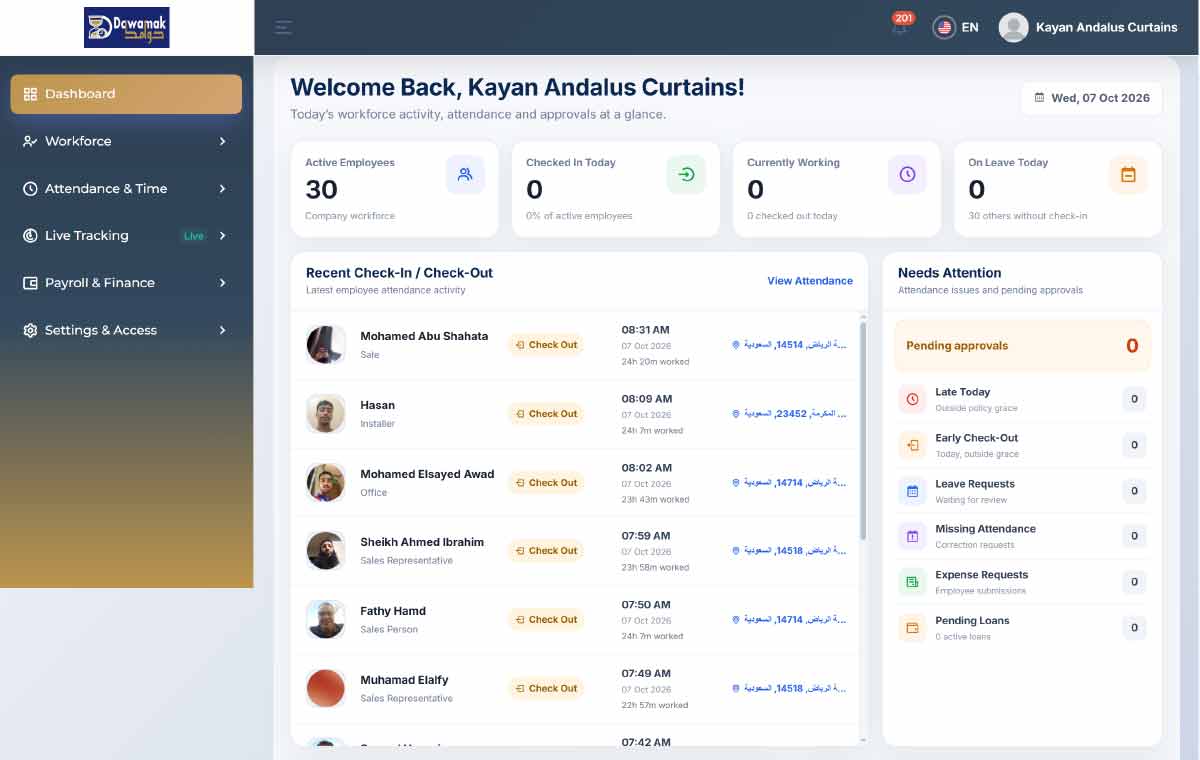
Dawamak Admin Web Dashboard Screenshot
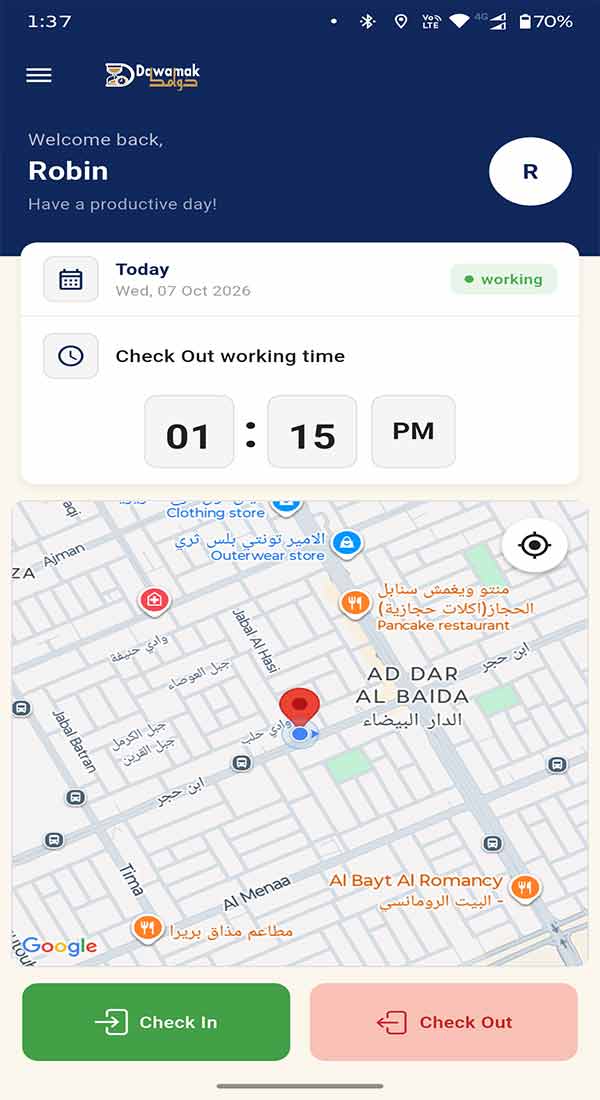
Dawamak Employee Mobile App Screenshot
ENTERPRISE HARDWARE & ERP INTEGRATIONS

Native ZKTeco Biometric & ERPNext v15/v16 Sync

Bridge office biometric terminals, field mobile GPS check-ins, and enterprise accounting in one automated cloud workflow.

ZKTeco ADMS & BioTime Cloud

Direct ZKTeco & ZKBioTime Biometric Terminal Sync

Eliminate manual USB exports and spreadsheets. Connect your ZKTeco fingerprint, face recognition, palm, and RFID terminals directly via Cloud ADMS Push or ZKBioTime API.

  • Direct ADMS Push & BioTime API: Receive live biometric punches across all branches automatically without middleware PCs.
  • Unified Mobile + Biometric Attendance: Combine hardware terminal punches with mobile GPS check-ins in a single attendance sheet.
  • Multi-Device & Serial Management: Monitor device heartbeat, last sync status, and map biometric PINs to employees in one click.
ZKTeco Push ADMS ZKBioTime Sync Face & Fingerprint Multi-Branch Devices
ERPNext v15 & v16 Official API

Two-Way ERPNext (v15 & v16) HR & Accounting Sync

Connect Dawamak to your cloud or self-hosted ERPNext instance in minutes using API Token authentication, and synchronize HR, payroll, and accounting records effortlessly.

  • Employee, Attendance & Leave Sync: Pull/push employee master records, daily attendance logs, and approved leave applications.
  • Payroll Salary Slips & Loans: Push monthly payroll runs, overtime earnings, and employee loan repayments straight to ERPNext.
  • 15% VAT Expense Journal Entries: Automatically post approved employee expenses with separated VAT tax accounts and invoice numbers.
Employee Master Sync Attendance & Leaves Salary Slips & Loans VAT Journal Entries
End-to-End Automated Workforce Pipeline: Zero manual spreadsheets—from punch capture to accounting ledger.
Mobile GPS + ZKTeco Terminals Shift, Policy & Overtime Engine Payroll & ERPNext v15/v16
COMPLETE ENTERPRISE SUITE

Everything You Need for Attendance, Policies, Payroll & HR

Built for office branches, retail chains, construction sites, and mobile field teams across Saudi Arabia and the MENA region.

1. Smart Mobile GPS, Geo-Fencing & Biometric Attendance

Live Selfie & GPS Check-In/Out

Capture instant camera selfies and exact GPS coordinates during check-in and check-out to prevent buddy punching.

Continuous Field Route Tracking

Monitor field reps and technicians with live breadcrumb route tracking throughout active shift hours.

Offline Attendance & Auto-Sync

Clock in/out with photo and GPS even at remote sites without internet; records sync automatically when back online.

Multi-Area Geo-Fencing

Assign one or multiple allowed circular geo-fence zones per employee or branch to restrict where staff can clock in.

ZKTeco & BioTime Cloud Sync

Sync fingerprint and facial recognition terminals directly to the cloud and merge punches with mobile attendance.

Missing Punch Request Workflow

Employees can submit missing check-in/out regularization requests with reasons for 1-click manager approval.

2. Multi-Shift Rosters, Late Deduction Policies & Overtime Engine

Multiple & Overnight Shifts

Schedule morning, evening, split, or cross-midnight night shifts across branches, departments, or individuals.

Automated Late & Early Policies

Configure grace minutes and tiered salary deduction rules for late arrivals and early departures automatically.

Custom Overtime Multipliers

Automate weekday, weekend, and official holiday overtime calculations with custom or Saudi Labor Law multipliers.

Holidays & Non-Working Days

Define weekly rest days and public holidays with automatic holiday overtime rate calculation when staff work.

Custom Allowances & Deductions

Configure housing, transport, commission, and fixed or percentage salary rules per employee.

Instant Excel & PDF Analytics

Export total working hours, late/early logs, overtime breakdowns, and monthly payroll sheets in one click.

3. Automated Payroll, Loans, 15% VAT Expenses & Role Permissions

Payroll & Stamped PDF Payslips

Generate monthly payroll runs with digitally stamped & signed PDF payslips delivered straight to the Employee App.

Employee Loans & Installments

Approve employee loan requests, schedule monthly installments, auto-deduct from payroll, and print repayment slips.

15% VAT Expense Management

Submit expense claims with multiple receipt photos, vendor tax ID, invoice number, and automatic 15% VAT calculation.

Granular Roles & Bulk CSV Import

Assign fine-grained permissions to HR managers, accountants, and branch supervisors, and bulk-import staff via CSV.

CLOUD WEB PORTAL + 2 MOBILE APPS

Dedicated Apps for Employees & Admins + Web Dashboard

Employees use a fast, intuitive mobile app for daily punches and requests, while owners and HR manage everything from the web or the standalone Admin App.

iOS & Android

Employee Mobile App

Check in/out with live photo & GPS (online or offline), view shifts, request leaves, loans, and VAT expenses, and download monthly PDF payslips.

Dawamak Employee Mobile App Screenshot
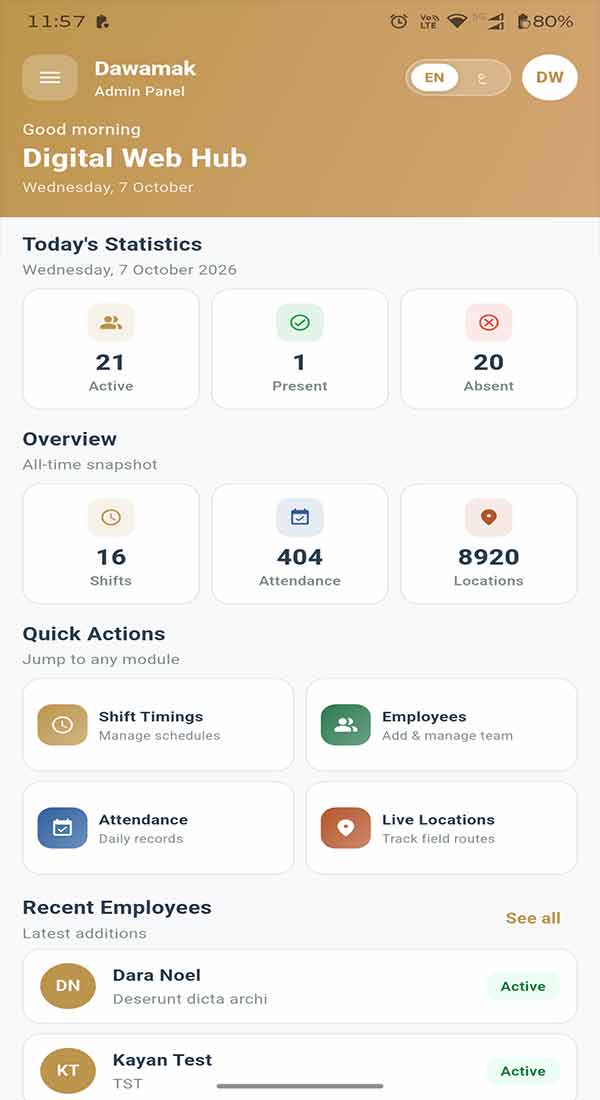
Standalone Admin App

Separate Admin & HR App

A dedicated mobile app for business owners, HR managers, and supervisors to monitor live GPS maps, manage shifts, and approve requests on the go.

Dawamak Separate Admin Mobile App Screenshot
Cloud Web Portal

Admin Web Dashboard

Full-featured browser portal to configure geo-fencing, ZKTeco devices, ERPNext sync, attendance policies, overtime, payroll, and role permissions.

Dawamak Admin Web Dashboard Screenshot

Multi-User Architecture with Granular Role Permissions

Add multiple admins, HR managers, payroll accountants, and branch supervisors with custom module-by-module access control.

Company Owner HR Managers Payroll & Finance Biometric & ERPNext Admin Branch Supervisors
TRANSPARENT & SCALABLE PRICING

Simple Per-Employee Pricing Built for Every Team Size

Get full access to Dawamak's attendance, biometric, ERPNext, and payroll suite—or request a tailored module plan for your organization.

Includes Mobile GPS + Live Tracking + ZKTeco Sync + ERPNext Integration + Overtime + Payroll + Loans + VAT Expenses
Monthly Yearly Save up to 30%
Starter Plan

Small Businesses

For companies with 1 to 49 employees

Includes All Core Modules & Apps
SAR 10 7 / employee / month
  • Live Photo & GPS Check-In/Out + Field Tracking
  • Offline Mode & Multi-Zone Geo-Fencing
  • Multi-Shifts, Late Policies & Overtime Engine
  • Automated Payroll, Loans, VAT Expenses & Leaves
  • ZKTeco Biometric & ERPNext v15/v16 Sync
  • Web Dashboard + Employee App + Admin App
Register with Starter Tier
Enterprise Plan

Large Organizations

For 100+ employees & multi-branch groups

Custom SLA & Dedicated Account Manager
Custom Quote Special volume discounts for 100+ staff
  • Unlimited Branches, Geo-Zones & ZKTeco Terminals
  • Full Two-Way ERPNext v15/v16 Automation
  • Custom Attendance, Shift & Overtime Policies
  • White-Glove Employee & Biometric Data Migration
  • Dedicated Account Manager & HR Team Training
  • Priority Technical Support & Custom Reports
Register for Enterprise Quote
FREQUENTLY ASKED QUESTIONS

Clear Answers About Dawamak

Everything you need to know about company registration, ZKTeco biometrics, ERPNext sync, GPS tracking, and payroll.

1. How does self-service company registration work on Dawamak?

Simply fill out the Company Registration form below (or on our `/register` page) with your company details, admin email, and chosen password. Your company profile is created immediately in our system, and our onboarding team activates your subscription plan and notifies you by email right away.

2. How does ZKTeco & ZKBioTime biometric integration work?

Dawamak supports both direct ZKTeco ADMS Cloud Push (`iclock/cdata`) and ZKBioTime server synchronization. Whenever an employee scans their fingerprint, face, or card at any branch terminal, the punch is pushed to Dawamak in real time and paired automatically with mobile GPS attendance logs.

Our native ERPNext v15/v16 connector synchronizes Employees, Daily Attendance records, Approved Leave Applications, Monthly Salary Slips (Payroll), Employee Loans, and VAT-compliant Expense Journal Entries (with 15% tax separation and invoice numbers).

Employees capture a live camera selfie and exact GPS coordinates when clocking in and out. For field staff, Dawamak records continuous GPS routes during active shift hours and stops automatically at check-out. Even if internet is unavailable, punches and routes are saved offline and sync automatically once connectivity returns.

You can configure custom attendance policies (grace periods and tiered late/early salary deductions) alongside weekday, weekend, and holiday overtime multipliers. Dawamak automatically computes net pay—including allowances and loan installments—and generates stamped, digitally signed PDF payslips.

Yes! Employees can upload multiple receipt attachments, vendor tax IDs, and tax invoice numbers with automatic 15% VAT calculation. Company owners can also create custom roles for HR managers, accountants, and branch supervisors with granular screen-level permissions.

Company Onboarding & Direct Contact

Register Your Company or Book a Live Demo

Complete the form to create your company account directly in Dawamak. Our team will assign your subscription plan and notify you immediately.

How Onboarding Works

1. Your company details, email & password are saved directly in Dawamak.
2. Our team assigns your employee tier & modules.
3. You receive an instant activation email to sign in at dawamak.com/login.

Register Your Company Account

Direct Portal Signup

Enter your organization details and choose your login password—no manual re-entry needed.

WhatsApp